

Collector focused fixes for humidor fan noise: nine quick checks, safe tests to isolate grinding or clicking, plus sizing and installation tips to prevent...
Grinding or sharp clicking means one thing: unplug the unit now, before a seized shaft burns out the motor windings. A steady hum, a soft whir, or occasional cycling is usually normal operation or an easy fix. If what you’re hearing is quiet and rhythmic, work through the checklist below before you call anyone. If it’s grinding, scraping, or clicking that won’t stop, pull the plug first and read the rest afterward.
TL;DR:
- Most fan noise issues are caused by airflow restrictions, loose components, or dust buildup rather than motor failure, and can often be fixed easily.
- Persistent grinding, scraping, or clicking indicates a seized shaft or impeller contact, requiring immediate power-off to prevent motor burnout.
- Regular maintenance such as cleaning blades, resealing gaskets, and ensuring vents are clear can significantly reduce noise and prolong humidifier lifespan.
- Upgrading to a quieter, commercial-grade humidifier may be more cost-effective than repeated repairs for older or heavily used units.
- Proper installation and sizing are crucial; mismatched or undersized humidifiers tend to run nonstop, accelerating wear and generating excessive noise.
Table of Contents
- Nine Quick Checks for Humidor Fan Noise
- What Different Fan Sounds Actually Mean
- Step-by-Step Fixes: Cleaning, Repairs, and Replacements
- Repair, Replace, or Upgrade: Making the Call
- Building a Maintenance Routine That Prevents Repeat Noise
- Fan noise is rarely a random mechanical failure. It is often a symptom of a system working harder than it should. A humidifier that’s undersized for its cabinet, or installed without attention to airflow geometry, will cycle constantly, and constant cycling is what wears out fans years before their time.
- How to Safely Test and Isolate the Noise Source
- Fan Noise vs. Other Humidor Sounds
- Choosing a Quieter Replacement Fan
- Temporary Fixes While You Wait for Parts or Repair
- A Collector’s Perspective on Living With an Active Humidifier
- Let Dunn’s Solve Your Fan Noise for Good
- Manuals and Support Resources Worth Bookmarking
- Sources
- FAQ
Nine Quick Checks for Humidor Fan Noise
Most humidor fan noise traces back to something you can fix in the time it takes to smoke half a Churchill. Before you assume the motor is dying, run through these checks in order. They’re arranged from fastest to most involved, so you’ll likely solve the problem before you reach number nine.
- Check the surface underneath the unit. A humidor sitting on carpet, an uneven shelf, or a slightly warped cabinet base will transmit vibration straight through the housing. Move it to a hard, level surface and see if the noise changes immediately.
- Listen carefully to locate the sound. Is it coming from inside the cabinet (the fan itself) or from an external compressor unit on a larger cooler? These have different failure points, and treating one like the other wastes time.
- Give the vents room to breathe. Cigars, boxes, and trays pushed up against the fan housing restrict airflow and make the motor work harder, which often shows up as a louder hum. Keep at least an inch of clearance around vents, since Whynter’s manual for its climate-controlled units specifically calls out uneven placement and blocked vents as common vibration triggers.
- Pull the humidifier cartridge and inspect it. A cartridge that’s overfilled or seated at a slight angle can block airflow around the fan blade. Remove it, check for pooling water, and reseat it firmly.
- Avoid the temptation to overfill “just to be safe.” More water doesn’t mean better humidity control. It means blocked vents and a fan that runs nonstop, trying to compensate, according to Cigar Oasis’s own troubleshooting guidance on constant-run complaints.
- Run the dollar-bill seal test. Close a dollar bill in the humidor’s seam and try to pull it out. If it slides free with no resistance, your seal is compromised and the humidifier is likely overworking to compensate, which strains the fan.
- Inspect the blades visually with a flashlight. Tobacco dust and cedar particles build up on impellers over months of use, and that residue can throw a blade out of balance long before it ever seizes.
- Check for loose accessories. Hygrometers, trays, and dividers that aren’t fully secured can rattle against the cabinet wall every time the fan cycles, and it’s easy to mistake that for a mechanical problem.
- If you hear clicking or grinding at any point, stop and unplug the unit. Don’t run it “one more day” to see if it clears up. Continued operation on a jammed motor risks burning out the windings entirely.
Pro Tip: *Keep a small flashlight and a spare dollar bill in your humidor accessory drawer.
What Different Fan Sounds Actually Mean
Not all humidor fan noise points to the same problem, and treating every sound as a five-alarm fire leads to unnecessary repairs. Here’s how to read what you’re hearing.
- Buzzing usually signals vibration rather than mechanical failure. A loose mounting bracket, a slightly unbalanced fan blade, or interference from a nearby electronic device can all produce a buzz. Try re-leveling the humidor and adding anti-vibration pads under the base before assuming anything’s broken.
- Whirring or a soft hum is often just normal cycling, especially in units that run frequent short bursts to hold humidity steady. But a continuous, louder hum that never quiets down can point to worn bearings or restricted airflow forcing the motor to work harder than it should.
- Clicking almost always means the impeller is making contact with something, either the housing itself or a foreign object like a stray tobacco leaf fragment. This is the sound NewAir’s troubleshooting documentation associates with blade contact, and it’s worth stopping the unit if the clicking persists past a few cycles.
- Grinding or scraping is the sound of friction where there shouldn’t be any, typically a shaft that’s partially seized or coated in residue. This is the noise that warrants powering off immediately, since continued operation risks permanent motor winding burnout.
- Constant, uninterrupted running with no cycling pattern often has nothing to do with the fan mechanically. It’s frequently an overfilled cartridge, an unseasoned humidor still reaching equilibrium, a compromised seal, or simply a cabinet too large for the humidifier installed in it.
One detail worth remembering: Cigar Oasis notes that a fan running nonstop is one of the most common complaints they field, and the root cause is rarely the fan motor itself. It’s almost always airflow, seal integrity, or wood seasoning working against it.
Step-by-Step Fixes: Cleaning, Repairs, and Replacements
Before touching anything mechanical, unplug the unit and note the model number and serial number, usually printed on a sticker inside the lid or on the humidifier cartridge housing. If the unit is still under warranty, attempting a DIY repair can void it, so check the terms before you reach for a screwdriver.
1. Clean the fan blades and housing
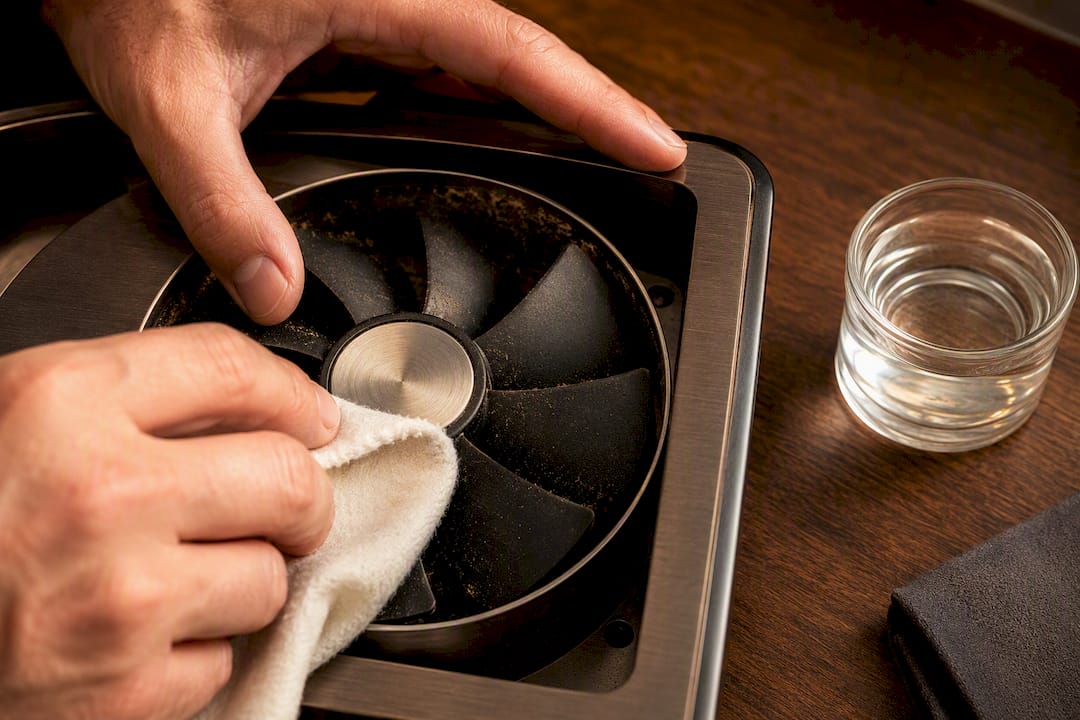
Dust and cedar particles are the single most preventable cause of fan noise in an actively used humidor. Wipe the blades gently with a cloth dampened in distilled water, never tap water, which leaves mineral deposits behind. For hard-to-reach housing interiors, a few short bursts of compressed air will dislodge debris without risking damage to delicate motor components. This is the same residue that, left unaddressed, hardens into the sludge that seizes shafts over time, which is why routine cleaning matters more than most owners assume.
2. Refill the cartridge correctly
Submerge the cartridge for the manufacturer’s recommended time, let it rest, and wipe away any excess before reinstalling. According to reviews of the Cigar Oasis Ultra 4.0, the most common refill mistake is skipping the rest-and-wipe step, which leaves dripping water that blocks the vent and forces the fan into constant operation.
3. Add anti-vibration mounting
Small adhesive foam pads or rubber feet placed under the humidor’s base can eliminate a surprising amount of buzz and rattle. If the noise is coming from an external compressor unit on a cabinet-style humidor, a section of anti-vibration foam matting underneath the compressor housing itself works even better than pads under the whole cabinet.
4. Reseat or replace a worn seal
If your dollar-bill test failed, check the gasket around the lid for compression or cracking. Some gaskets can be reseated with light adjustment; others need replacement. A failing seal doesn’t just waste humidity, it forces the fan to cycle far more often than it should, accelerating wear on components that were never designed for that duty cycle.
5. Replace the fan, if you’re comfortable with basic electronics
This is the point where most owners should pause and consider whether professional help makes more sense. If you proceed, match the replacement fan’s voltage and physical dimensions exactly to the original, and photograph the existing wiring connections before disconnecting anything.
Silent operation when humidity drops below target, erratic spinning that starts and stops without pattern, or a persistent H2O error message on the display all point to circulation failure at the motor level. Guidance on repairing Cigar Oasis motors is direct on this point: forcing a jammed motor to keep running risks permanent damage to both the motor and the circuit board.
Pro Tip: If you smell anything electrical, burnt plastic, ozone, or scorched dust, stop immediately and disconnect the unit from power at the wall, not just the device switch. That smell means heat has already built up somewhere it shouldn’t have.
When to stop and call a professional
A few signs mean this isn’t a weekend project anymore. Visible scorching or discoloration on the circuit board, a persistent burnt odor even after cleaning, or a motor that overheats within minutes of restart all point to a problem beyond blade cleaning or cartridge maintenance. At that point, continuing to experiment risks turning a $150 fan replacement into a $600 full-unit failure.
Repair, Replace, or Upgrade: Making the Call
Once you’ve ruled out the easy fixes, the real decision comes down to three numbers: repair cost, replacement cost, and how old the unit already is.
- If the humidifier is still under warranty, route the repair through the manufacturer rather than attempting a DIY fix, especially if you suspect the circuit board is involved. Warranty repairs also protect you from voiding coverage on a unit that might fail again in six months.
- If the unit is out of warranty and the motor windings or PCB show damage, replacement is almost always the better financial move. A new commercial-grade humidifier often costs less than a specialized motor repair once you factor in diagnostic time and parts.
- Age matters more than owners think. A fan that’s run continuously for four or five years has likely absorbed years of tobacco dust and humidity cycling, and one repair now often just delays a second failure a year later.
- If you manage a large or heavily used humidor, a compact residential-grade fan may simply be undersized for the job. Sensor-controlled, commercial-grade humidifiers cycle in shorter, measured bursts rather than running continuously, which reduces both wear and noise over the unit’s lifespan.
The math is straightforward once you write it down: if repair quotes approach a majority of a comparable new unit’s price, replacement almost always wins, both financially and in terms of how soon you’ll be dealing with this again.
Building a Maintenance Routine That Prevents Repeat Noise
The best fan noise fix is the one you never have to make because you caught the problem in month one instead of month eighteen. A simple calendar-based routine handles most of this without much effort.
- Monthly: Visually inspect the fan blades with a flashlight, check the cartridge water level, and confirm the one-inch clearance around vents hasn’t been compromised by rearranged cigars or boxes.
- Quarterly: Do a deeper clean of the interior, targeting the residue that tobacco dust and humidity combine to form on shafts and housing surfaces over time.
- Seasonally: Reseason the wood if you notice increased fan cycling as temperatures shift, and rerun the dollar-bill seal test, since gaskets compress and loosen with seasonal humidity swings.
- Ongoing: Keep vibration dampeners under the unit and resist the habit of stacking boxes or trays against the vent side of the cabinet, even temporarily.
Pro Tip: Set a recurring phone reminder for the first Saturday of each month labeled “humidor check.” It takes less time than trimming a cigar and catches problems while they’re still a five-minute fix.
Our care guides walk through the full seasonal maintenance calendar in more detail, including specific cleaning intervals for different wood types and climates.
Fan noise is rarely a random mechanical failure. It is often a symptom of a system working harder than it should. A humidifier that’s undersized for its cabinet, or installed without attention to airflow geometry, will cycle constantly, and constant cycling is what wears out fans years before their time.
Precision matters here in a way that’s easy to underestimate. A system holding relative humidity within a tight ±1 to 2% band cycles far less often than one drifting within a looser ±5 to 10% range, because it never has to work hard to correct large swings. Less cycling means less mechanical stress, and less mechanical stress means a quieter cabinet for years longer. We cover the practical difference between these tolerances in our comparison of active and passive humidification.
Correct sizing matters just as much as precision. A humidifier rated for a 150 count desktop box, dropped into a 400 count cabinet, will run near constantly trying to keep up, and that’s a fan noise complaint waiting to happen in month three. Installation quality plays its own role too. White-glove installation accounts for vent placement, cabinet clearance, and mounting stability from day one, which prevents the vibration and airflow restriction that generate most of the noise complaints we hear about secondhand.
For readers matching a replacement unit to their collection size, we recommend three options depending on scale:
- HYDRA SM Electronic Cigar Humidifier for desktop and small cabinet humidors.
- HYDRA LG Electronic Cigar Humidifier for mid-to-large cabinets that need stronger circulation without constant cycling.
- HYDRA Turbo Commercial Electronic Humidifier for walk-in installations and large commercial cabinets carrying heavy, sustained loads.
How to Safely Test and Isolate the Noise Source
Pinpointing exactly where a sound originates saves you from replacing the wrong component. Start by placing your ear near, not against, different sections of the humidor: the fan housing, the compressor (on cooler-style units), and the cabinet base itself. Sound travels through wood and metal differently than through open air, so what seems like it’s coming from the fan might actually be a vibrating shelf bracket transmitting the sound elsewhere.
A simple isolation trick: unplug the humidifier entirely and listen for five minutes. If the noise stops completely, it’s electrical or fan-related. If a rattle or hum continues, you’re dealing with something structural, a loose panel, an unsecured tray, or a shifting hygrometer mount, not the fan at all.
You can also isolate the fan itself by removing it from its housing (with the unit unplugged) and briefly powering it externally if you’re comfortable with basic wiring, though this step is best left to those with some electronics background. A rolled towel placed strategically around the cabinet’s open seams during testing can also dampen ambient sound enough to help you localize where the noise is loudest.
Pro Tip: Record the sound on your phone before you start troubleshooting. Comparing a “before” recording to how things sound after each fix tells you definitively whether a step worked, rather than relying on memory alone.
Fan Noise vs. Other Humidor Sounds
Owners frequently mistake normal humidification sounds for fan trouble, which leads to unnecessary panic or, worse, unnecessary repairs. Learning to tell these apart saves both money and stress.
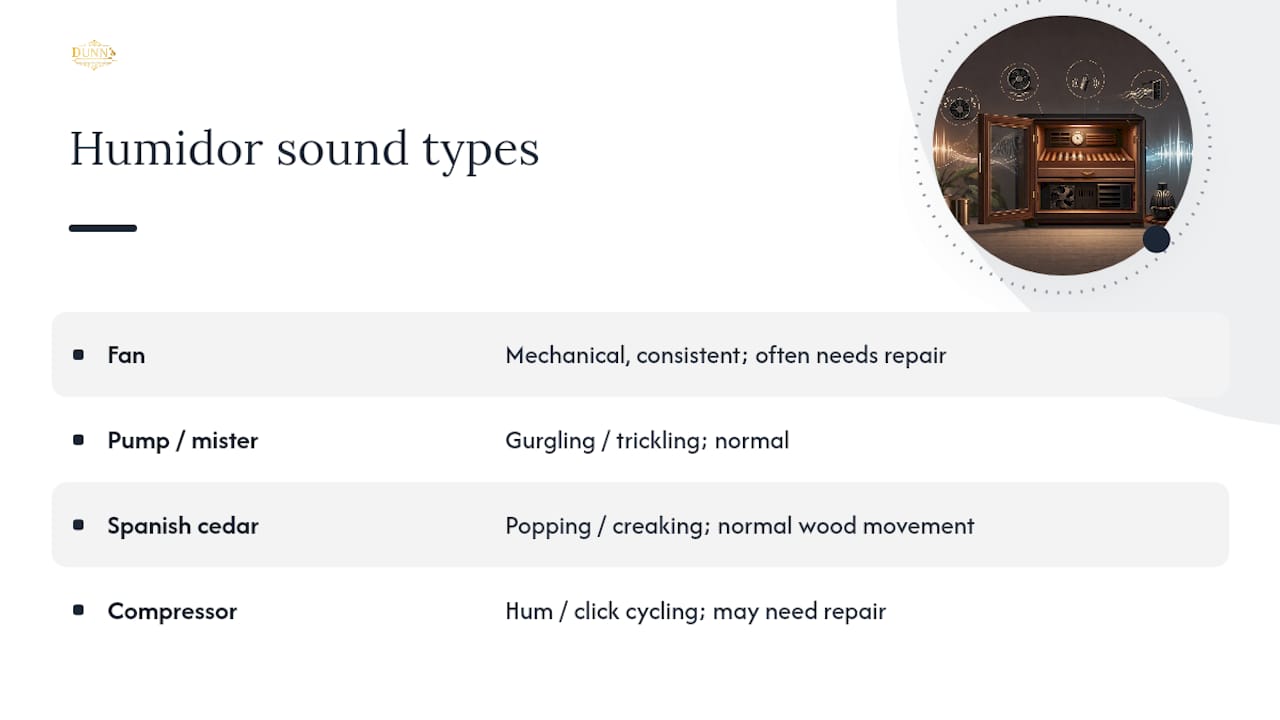
The humidifier’s water pump or misting mechanism, separate from the fan itself, often produces a brief gurgling or trickling sound during active cycles. This is completely normal and shouldn’t be confused with fan noise, which tends to be more consistent and mechanical in character rather than liquid-sounding.
Wood movement is another frequent source of confusion. Spanish cedar, the material lining most quality humidors, expands and contracts with humidity changes, and this can produce faint popping or creaking sounds as the wood settles. Manufacturer documentation for climate-controlled units, including Whynter’s noise troubleshooting guidance, specifically lists these contracting sounds as normal rather than a defect.
Compressor units on larger, cooler-style cabinets add another layer: the compressor cycling on and off produces its own hum and click pattern, distinct from an internal circulation fan. If your unit has both, isolating which component is making the objectionable noise (fan versus compressor) determines whether you’re looking at a simple part swap or a more involved repair. When in doubt, the unplug-and-listen test described above separates fan noise from ambient wood and structural sounds within minutes.
Choosing a Quieter Replacement Fan
If cleaning, resealing, and re-leveling haven’t solved the problem, a fan replacement is often more affordable than most owners assume, and it’s a genuine opportunity to upgrade to quieter hardware rather than replacing like-for-like.
Look for brushless DC fan motors when shopping for replacement parts. They run cooler, last longer, and produce noticeably less mechanical noise than the brushed motors found in many older or entry-level humidification units. Match the replacement exactly on voltage and physical dimensions since a fan that’s even slightly oversized for its housing will introduce new vibration rather than solving the original problem.
For collectors dealing with recurring noise on an aging unit rather than a single fan failure, it’s often more practical to replace the entire humidifier assembly instead of chasing individual part replacements. A commercial-grade sensor-controlled unit, of the kind used in larger cabinet and walk-in installations, cycles in short measured bursts rather than running continuously, which is both quieter day to day and considerably easier on the components long term.
Our electronic humidor collection includes sizing guidance if you’re trying to match a replacement unit’s output to your cabinet’s actual volume rather than guessing.
Temporary Fixes While You Wait for Parts or Repair
Sometimes the right replacement fan is backordered, or your schedule doesn’t allow for a repair this week. A few temporary measures reduce noise without risking your collection in the meantime.
Anti-vibration pads under the humidor base offer the fastest, cheapest noise reduction available, often cutting a noticeable buzz down to something barely audible within minutes of installation. If the cartridge is the suspected culprit, running the unit with it removed temporarily (while monitoring humidity manually with a separate hygrometer) stops the noise entirely, though this isn’t a long-term solution since you’ll need active humidification restored within a few days.
Relocating the humidor to a room where ambient noise, a white noise machine, or simple distance, masks the sound is a reasonable stopgap if the noise itself isn’t a safety concern (no clicking or grinding). Just don’t let “I got used to the sound” become a substitute for actually addressing the root cause. A fan that’s straining today rarely fixes itself by next month.
A Collector’s Perspective on Living With an Active Humidifier
Every serious collection with active humidification will produce some fan noise. Accepting the occasional quiet cycling hum is part of owning a system that’s actually doing its job, correcting humidity rather than letting it drift. What you shouldn’t accept is a new grinding or clicking sound, ever. Those aren’t quirks to tolerate. They’re a shaft or impeller telling you it needs attention now, not next month.
The owners who never deal with fan replacements aren’t lucky. They’re the ones who kept a simple maintenance habit running in the background for years. A five-minute weekend check, blades, cartridge, vent clearance, becomes second nature faster than you’d expect, and it’s the single habit that separates a humidor that lasts a decade from one that needs a new motor by year three.
— Belle Dunn
Let Dunn’s Solve Your Fan Noise for Good
If you’ve worked through the cleaning, resealing, and cartridge fixes above and the noise persists, the honest answer is often that the original humidifier was undersized or nearing the end of its service life. A specific product line offers precision cycling designed to run less often, wear less, and stay quieter for years longer than standard replacement fans.
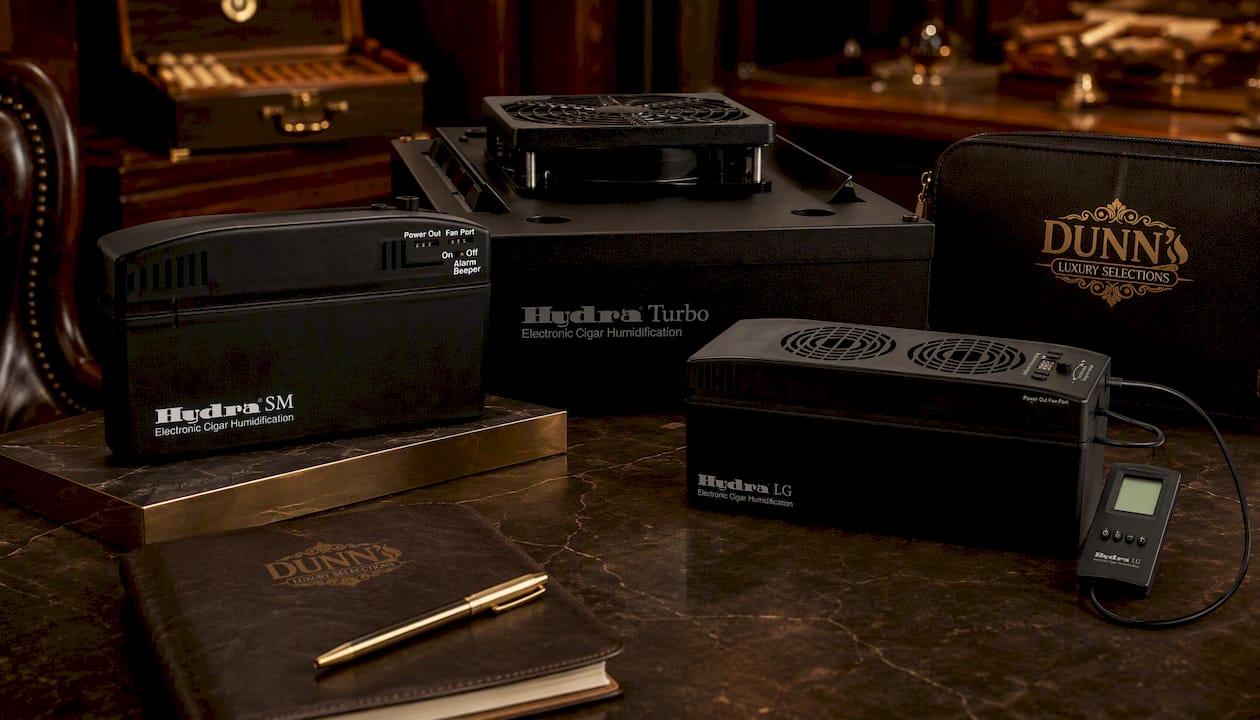
For desktop boxes and small cabinets, the HYDRA SM Electronic Cigar Humidifier delivers tight humidity control without oversizing the unit for the space. Mid-to-large cabinets do better with the HYDRA LG Electronic Cigar Humidifier, built for stronger circulation without the constant cycling that wears out smaller fans. For walk-ins and heavily used commercial cabinets, the HYDRA Turbo Commercial Electronic Humidifier handles sustained load without the noise complaints that come standard with undersized residential units.
White-glove delivery and professional installation address the other half of the equation: correct vent placement, secure mounting, and proper airflow geometry from the first day, not after you’ve already diagnosed a vibration problem yourself. Browse the full electronic humidor collection or request a consultation to get a sizing recommendation matched to your specific cabinet.
Manuals and Support Resources Worth Bookmarking
Model-specific documentation answers questions this article can’t, since every manufacturer’s fan assembly and cartridge design differs slightly.
- Whynter CHC-120S user manual for placement and noise troubleshooting specifics.
- Whynter CHC-122BD user manual for normal-versus-abnormal noise reference.
- Cigar Oasis FAQ page for cartridge and constant-run troubleshooting.
- NewAir troubleshooting guide for clicking and blade-contact diagnostics.
- Rapidrepair for motor failure symptoms and DIY repair steps.
Sources
- Whynter CHC-120S user manual (noise and placement guidance)
- Cigar Oasis FAQ — common causes of constant fan operation
- NewAir troubleshooting steps for fan noise
- Rapidrepair
FAQ
Should I be worried if my humidor fan is making noise?
Not always. Soft humming or intermittent cycling is normal operation, but grinding, scraping, or persistent clicking means you should power off the unit immediately to avoid motor damage.
What is the 135 rule for cigars?
The commonly cited target is storing cigars around 70°F and 70% relative humidity, sometimes referred to informally as a “70/70” guideline rather than a fixed “135” standard; definitions of a specific “135 rule” vary and aren’t standardized across manufacturers.
Why does my humidifier keep making a loud, constant noise?
A continuously running fan usually points to an overfilled cartridge, a compromised seal, unseasoned wood still reaching equilibrium, or a humidifier that’s undersized for the cabinet it’s installed in.
Should the fan be off when using a humidifier?
No, the fan is part of how most active humidification systems circulate moisture evenly throughout the cabinet, so it should cycle on and off automatically rather than being switched off manually during normal operation.
How do I know if it’s the fan or the compressor making noise?
Unplug the unit briefly and listen. If the sound stops completely, it’s fan or motor related; if a hum or rattle continues, check compressor mounting or structural components like shelves and panels instead.
Can I replace a humidor fan myself?
Yes, if you’re comfortable with basic wiring and can match the replacement fan’s voltage and dimensions exactly, though units still under warranty should go through the manufacturer to avoid voiding coverage.
When should I replace the entire humidifier instead of just the fan?
Replace the full unit when the motor windings or circuit board show damage, when repair costs approach the price of a comparable new unit, or when the humidifier is clearly undersized for your cabinet’s volume.
Recommended
You May Also Enjoy
Cigar Locker Dimensions: Sizing Guide for Collectors and Lounges
Cigar locker dimensions explained: compartment sizes, cabinet footprints, capacity math and clearances, so you size a locker bank...
Read Article
Sealing a Walk-In Humidor: Envelope, Door and Penetrations
How to seal a walk-in humidor properly: vapor barrier placement, door gasket, penetrations and the controlled airflow a...
Read Article
Retail Humidor ROI: How to Measure What a Display Earns
What does a retail or lounge humidor really return? A practical framework for cigar shops, lounges and clubs:...
Read Article